
The Off-Grid Communication Stack: Mesh Networks, Encrypted Apps & Backup Plans
Your internet goes down. Your phone loses signal. The carrier towers are either overloaded or offline. Now what?

Most people reach for their phone, get nothing, and wait.
That’s the wrong posture.
If you’ve been reading here for any length of time, you already know that waiting for infrastructure to rescue you is a plan built on someone else’s uptime.
Communication is a dependency you can own. Here’s how to build it in layers.
Why You Need a Stack, Not a Single App
Signal is great. Nostr is great. But both of them require internet.
When the network goes down, software-based solutions go with it unless you’ve built something underneath them.
A real communication stack has layers: cloud-dependent apps at the top, internet-independent protocols in the middle, and hardware-based fallbacks at the bottom.
Each layer handles a different failure mode. You don’t pick one, you build all three.
Layer 1: Encrypted Apps (While Internet Exists)
Start here because most disruptions are partial, not total. Your ISP goes down but your cellular data works.
Or you’re on WiFi but your carrier is congested. Encrypted apps cover most real-world scenarios.
Signal is the baseline.
Open source, end-to-end encrypted, the audits check out. Use disappearing messages. Enable the screen lock. If you’re not already on it, that’s the first thing to fix today.
For Nostr users, the picture gets more interesting.
Nostr clients like Damus (iOS) or Amethyst (Android) route through relays you choose or self-host.
If the mainstream relays go down, your messages still propagate through whatever relays are still up, including ones you’re running yourself.
That’s meaningfully different from Signal’s centralized server architecture.
Pair either app with a reliable VPN (Mullvad, self-hosted WireGuard) and you’ve covered the surveillance angle on top of the availability angle.
One practical thing most people skip: keep an updated contact list somewhere offline.
When everything breaks, you’ll want phone numbers, Nostr pubkeys, and mesh node IDs in one place, not locked inside an app you can’t open.

Layer 2: Mesh Networks (No Internet Required)
This is where it gets genuinely interesting.
Mesh networks route messages peer-to-peer over radio frequencies.
No carrier, no ISP, no server.
Devices form a network with each other, hopping signals across nodes until the message reaches its destination.
Bitchat
Start here because the barrier to entry is zero.
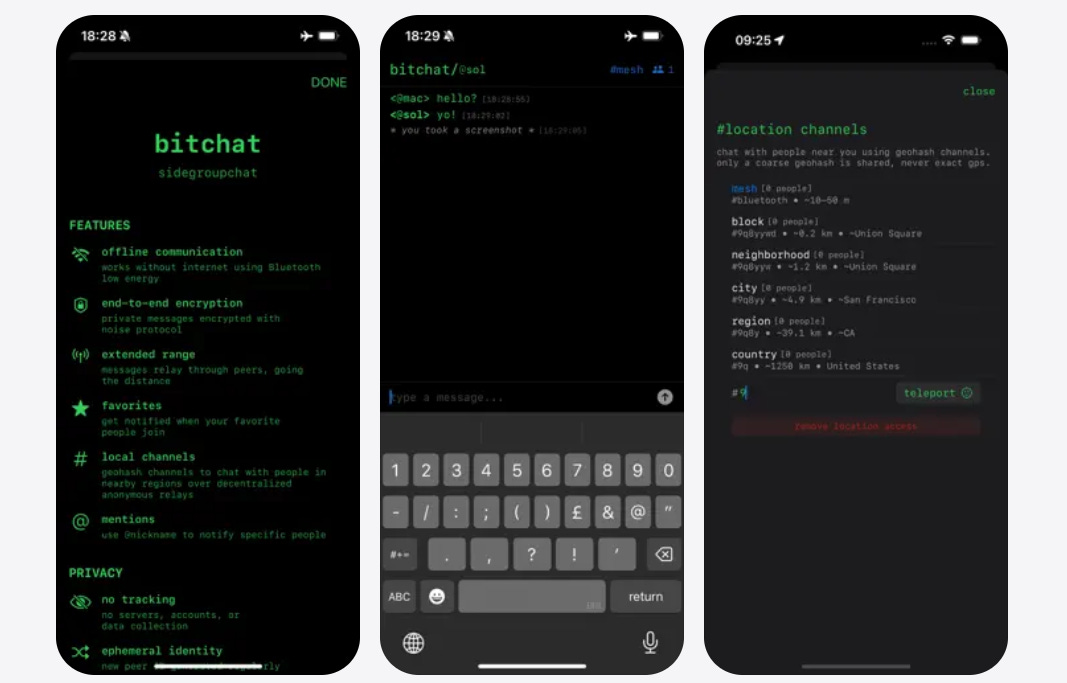
Bitchat is an open-source messaging app that runs entirely over Bluetooth mesh. No internet, no servers, no user accounts, no phone numbers. You open the app and you’re on the network. Everyone nearby running Bitchat is a potential relay node.
Jack Dorsey’s team at Block built and open-sourced it. The architecture is clean: devices discover each other over Bluetooth Low Energy, messages hop peer-to-peer through whoever’s in range, and nothing touches a server because there are no servers to touch.
The tradeoff is range. Bluetooth caps out around 100 meters per hop, so Bitchat is a proximity tool, not a regional one. In a dense environment (a neighborhood, a venue, a protest, a grid-down urban scenario) it works well.
In rural terrain with houses a kilometer apart, you’ll want LoRa hardware underneath it.
It also supports Bitcoin Lightning payments natively, which is worth noting if you’re building a full self-sovereign comms and payments stack. That integration exists nowhere else in this category.
Install it now, before you need it. Get a few people in your immediate circle on it. It costs nothing and takes 3 minutes.
Meshtastic
Meshtastic is the tool to know.
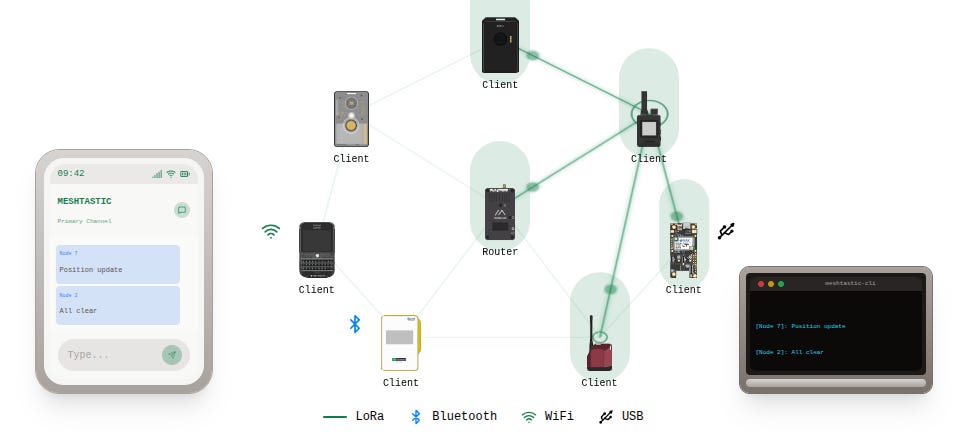
It runs on cheap LoRa hardware (the Heltec V3 or LILYGO T-Beam are common starting points, both under $40), uses the 915 MHz band in North America, and can cover serious distances: 5-10 km line-of-sight in open terrain, more with elevation.
The protocol is open source. The app is free. You can send text messages, share GPS coordinates, and set up a basic network across a neighborhood or a group of friends spread across a rural area.
Range depends on terrain and antenna.
A stock whip antenna on flat ground gets you a few kilometers. Mount a node on a roof with a proper directional antenna and that number climbs fast. LoRa nodes can be solar-powered, so a well-placed relay node runs indefinitely without intervention.
Meshtastic also supports encrypted channels.
Set a pre-shared key across your group’s devices before you need them, not during an incident.
GoTenna Mesh (and why it’s second-tier now)
GoTenna’s hardware works and has better UX polish than Meshtastic.
But it’s a closed ecosystem, the company has had financial turbulence, and the range-to-price ratio doesn’t compete with LoRa hardware anymore.
Worth knowing about, not worth anchoring to.
Reticulum + LoRa
For more technically inclined readers: Reticulum is a cryptographic network stack built for unreliable, low-bandwidth links.
It runs over LoRa, serial connections, I2P, or whatever transport you can give it.
The associated app ecosystem (Nomad Network, Sideband) lets you run encrypted messaging and even rudimentary services over this stack.
It’s more complex to configure than Meshtastic, but the architecture is more capable.
Worth the investment if you want a serious local-area network that runs entirely on hardware you control.
Layer 3: Radio Fallbacks (When Everything Else Fails)
Below mesh, you hit licensed and unlicensed radio.
This is the bottom of the stack, meaning you should only need it when both the internet and your mesh are down.
But it covers scenarios the other layers can’t.
GMRS
General Mobile Radio Service requires an FCC license ($35, covers your whole family, no exam required) and covers distances up to 30-50 km with a decent radio and repeater access.
The Midland MXT115 and Wouxun KG-1000G are solid hardware choices.
GMRS repeaters are often community-maintained.
Find the ones in your area before you need them. A list of active GMRS repeaters is on mygmrs.com.
Ham Radio
A Technician license (easy exam, $15, open to anyone) gets you access to VHF/UHF bands including local repeaters.
An Extra-class license opens up HF bands capable of intercontinental communication without any infrastructure at all.
HF is the ultimate long-range fallback.
During major disasters when every other communication system has failed, operators on 40m and 80m bands are still talking to each other across thousands of kilometers.
The hardware for this (a used Icom IC-7300 or Yaesu FT-891 plus a simple wire antenna) isn’t cheap, but it’s permanent infrastructure you own.
For voice, HF is hard to beat. For encrypted data over radio, look into Winlink (email over radio) or JS8Call (keyboard-to-keyboard messaging over HF using weak signal modes).
Satellite: The Premium Fallback
Garmin inReach devices use the Iridium satellite constellation.
Two-way messaging anywhere on earth, no cell signal required.
The cheapest plan is about $15/month for 10 messages.
It’s not a communication workhorse, but for a serious emergency where mesh and radio aren’t reaching the right people, it’s a lifeline.
Starlink covers the high-bandwidth satellite case.
If you have a fixed location (off-grid cabin, homestead, base of operations), a Starlink terminal gives you broadband that’s independent of terrestrial infrastructure.
It needs power and a clear sky view, both of which are solvable problems.
Building the Stack: What to Actually Do
Here’s a concrete starting point. You don’t need to build all of this at once.
Month 1: Get everyone in your group on Signal. Create an encrypted Nostr account and start using it. Get your contact list into a physical format.
Month 2: Buy 2-4 Meshtastic nodes (Heltec V3 is the easiest entry point). Configure them with a private encrypted channel for your group. Test range in your actual terrain.
Month 3: Get your GMRS license ($35 at the FCC website, takes about a week). Buy a pair of GMRS handhelds. Find the repeaters in your area and program them in.
Month 4+: Study for your ham Technician license.(USA, Canada) Learn your local repeater network. If you’re serious about long-range, start looking at HF equipment.
The Garmin inReach fits in whenever budget allows. It’s not urgent, but it closes the “everything else failed” gap cleanly.
The Network Effect Problem (And How to Solve It)
A communication system you built alone is only as useful as the people on the other end of it.
This is the part most people skip when they set up their Meshtastic network and then have exactly 1 node.
Your group needs to be on the same tools before something happens.
That means convincing a few people to put a Meshtastic node in their house, or getting your immediate family on Signal with disappearing messages enabled, or doing a Saturday afternoon radio check with your neighbors.
Meetups and communities exist partly for this reason. Local networks are physical infrastructure.
Building a communication stack in isolation is better than nothing.
But a stack that connects you to 5 trusted people nearby is worth 10x more than one you built alone.
Quick Reference table
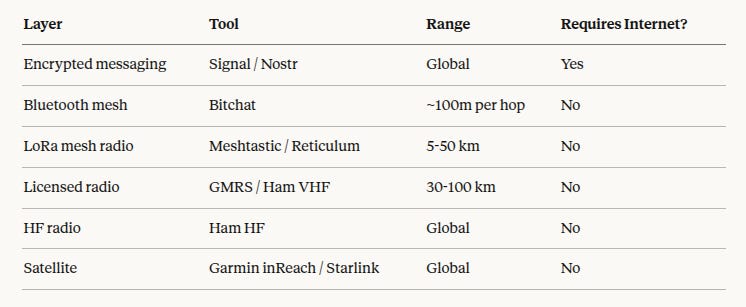
Build down the stack. Each layer you add is a dependency you’ve stripped away from someone else’s infrastructure.
That’s the point.
Getting your ham license is easy and you can even do it online now https://vinthewrench.substack.com/p/hamming-it-up
Great post! Clearly written, quality information, ends with a plan. Much appreciated!